A short mission explantion
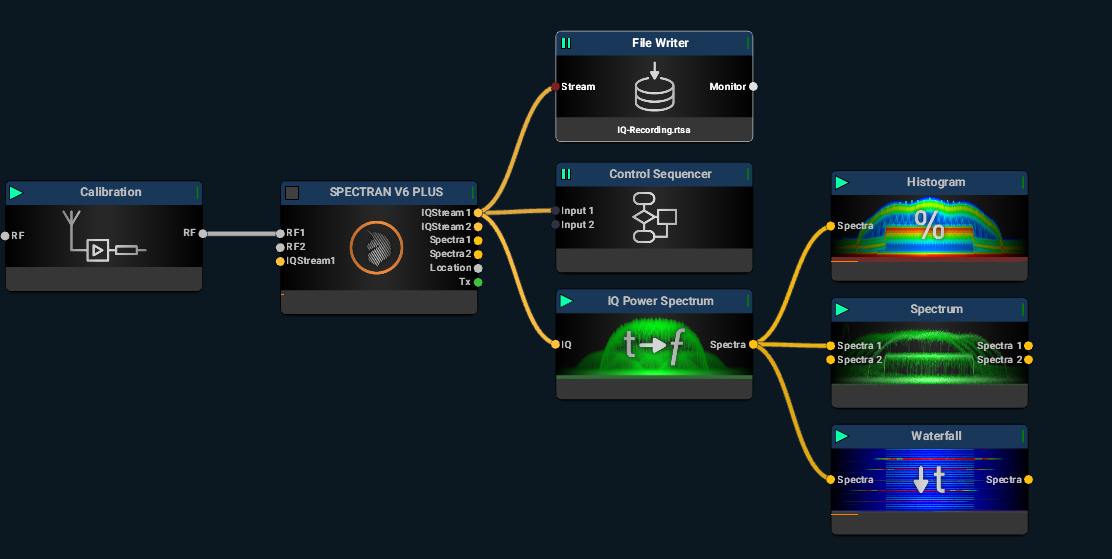
An explantions of all the blocks used in this mission
Calibration Block
The Calibration Block provides full control over all losses and gains to the receiver. For instance, if you’re using a calibrated antenna from Aaronia, you can select it in the Calibration Block to ensure that the final results align with the antenna's gain/loss diagram.
https://v6-forum.aaronia.de/forum/topic/calibration-block/
Spectran V6 Plus Block
This is the hardware block, and you can choose either the Plus or Eco model.
https://v6-forum.aaronia.de/forum/topic/spectran-v6-block/
https://v6-forum.aaronia.de/forum/topic/spectran-v6-eco/
File Writer
The File Writer records either IQ or Spectra data, depending on where you connect it. In the illustration below, it will record IQ data; however, if you switch the connection to the Spectra Output on the IQ Power Spectrum, it will record Spectra data.
https://v6-forum.aaronia.de/forum/topic/file-writer/
Control Sequencer
The Control Sequencer allows you to add commands such as start, stop, and loop to your mission or blocks, providing greater control over the process.
https://v6-forum.aaronia.de/forum/topic/control-sequencer/
IQ Power Spectrum
This block converts IQ data to Spectra using FFT. Note that higher FFT settings require more CPU resources.
https://v6-forum.aaronia.de/forum/topic/iq-power-spectrum/
Spectrum
The Spectrum view displays the typical FFT spectrum, showing the amplitude of a signal.
https://v6-forum.aaronia.de/forum/topic/spectrum/
Histogram
The Histogram view presents a graphical representation of signal strength over time, allowing you to analyze the distribution of signal amplitudes.
https://v6-forum.aaronia.de/forum/topic/histogram-block/
Waterfall
The Waterfall view provides a time-based display of frequency spectrum data, showing how the signal's amplitude changes over time. This view is useful for identifying signal fluctuations and interference patterns.
Was this helpful?