Filters, and why you should use them.
There are many scenarios where using a filter—such as a bandpass, low-pass, or high-pass filter. They can significantly improve your spectrum analysis. Each has a purpose:
Low-pass filters block high frequencies.
High-pass filters block low frequencies.
Bandpass filters allow only a specific range through.
Band-stop filters block a specific frequency range.

In Wi-Fi spectrum analysis, bandpass filters are especially useful. One common use case is to simulate what a client radio or access point would detect. Spectrum analyzers often cover a broader frequency range than typical Wi-Fi devices, which means they can pick up strong out-of-band signals like LTE or GSM that the actual device wouldn’t. These unwanted signals can cause amplifier overload, leading to false images, artifacts, and inaccurate spectrum readings.
Always start at -20dBm with no amps enabled.
An RF limiter can protect components from physical damage, it won’t prevent overload since that can happen at at around 0 to -10dBm. This is not specific to Aaronia, but happens to most or all spectrum analyzers with a sensitive front-end. The Ekahau Sidekick 2 for example overloads at around -20dBm.

Set the ref-level a few dB above the maximum signal you might expect. On the Eco this automatically disables the preamps, while on the Plus you do it manually. Remember that any signal within the receiver’s range, not just the one you’re focusing on can contribute to overload. Raising the reference level helps reduce distortion and acta like an attenuator, but in environments with very strong nearby signals, a dedicated bandpass filter is often the more effective solution.
Tip: When purchasing a Spectran, buy with a Power Meter, this can be used to detect strong signals and override ref.level/amp settings in future software releases.
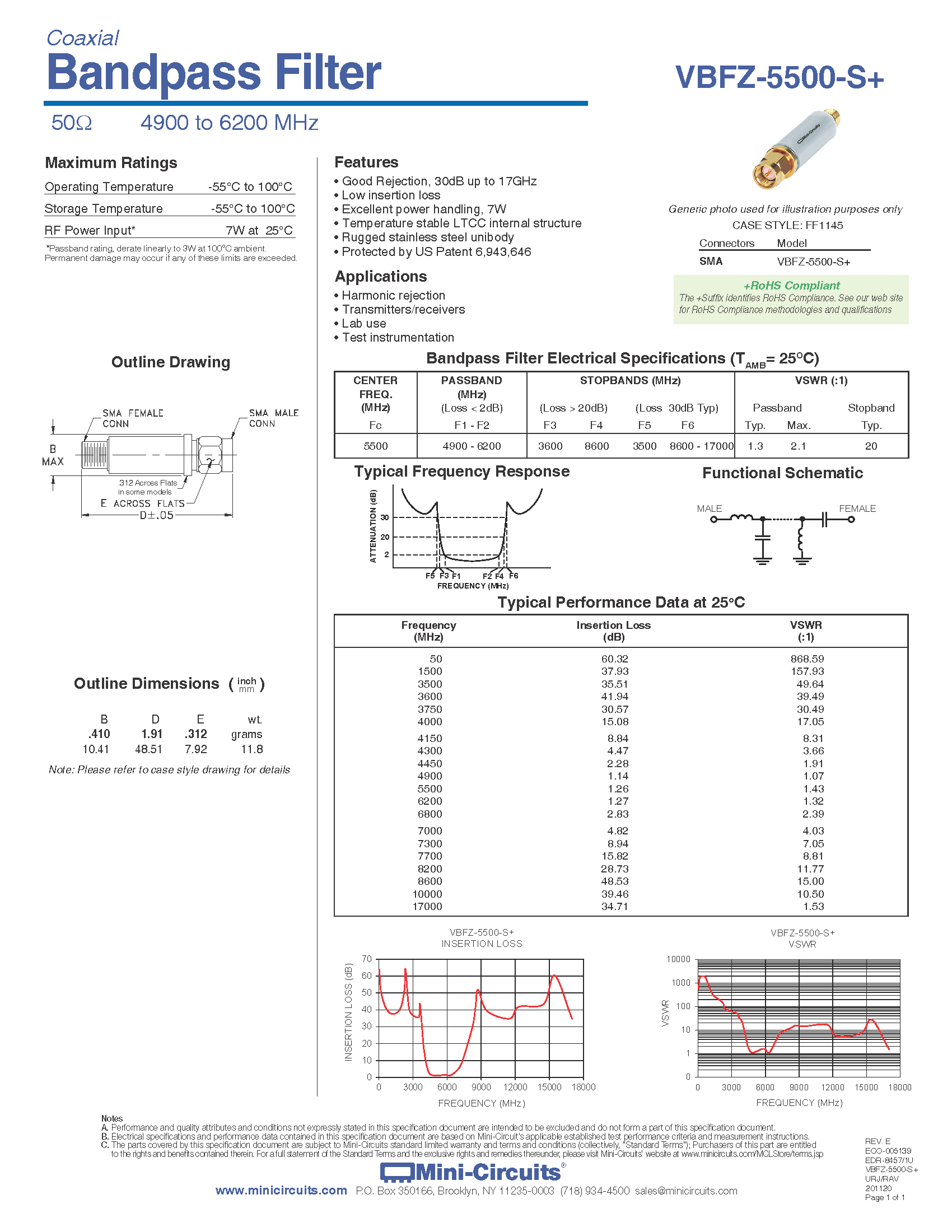
Bandpass
Below is an example of a bandpass filter ideal for 5 GHz Wi-Fi. With only a 2.8 dB loss at 6800 MHz, meaning good for U-NII5 for us EU people. Aaronia will release one with a built in RF-Limiter soon.
High Pass
If you need something to attenuate signals below 3 GHz, so you can focus on 2.4 to 7 GHz a high-pass can be needed, just keep in mind that any strong signals at 3.5-3.8 (Celluar) will still be visible, but this will help protect from strong signals that is often seen under 3 GHz.
I will not cover all kinds of filters here, mainly focused on Wi-Fi where bandpass and high-pass is often used and what I would recommended. Search on sites like DigiKey to find the filter you need, maybe a bandpass for 5.1 to 7 GHz to attenuate everything else to only focus on Wi-Fi measurements.
Read more: The Basics of Low and High Pass Filters – DigiKey
Last updated
Was this helpful?